
How to Remove Outlook Mobile Signature on iPhone and Android
If you’re planning to remove Outlook mobile signature before deploying automated email signatures with Exclaimer, this guide will walk you through the exact steps. Removing your Outlook mobile signature ensures your emails remain clean, professional, and free from duplicates.
This prevents duplicate signatures and ensures your emails display a clean, professional format every time.
Why You Should Remove Outlook Mobile Signature Before Using Exclaimer
If you don’t remove the Outlook mobile signature, duplicate signatures may appear.
🚀 Why Exclaimer?
Automated signature platforms like Exclaimer allow organizations to:
- Standardize email signatures across all employees
- Automatically apply branding, titles, and contact details
- Add marketing banners or announcements
- Ensure consistency across desktop, web, and mobile devices
- Eliminate manual updates and user errors
In short, it gives your organization full control over email communication and branding.
📱 Step-by-Step Instructions
1. Open the Outlook App
Launch the Outlook mobile app on your device.
2. Go to Settings
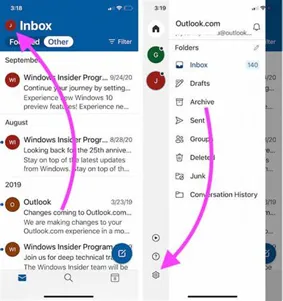
- Tap your profile icon (top-left corner)
- Tap the gear icon (Settings)
3. Open Signature Settings
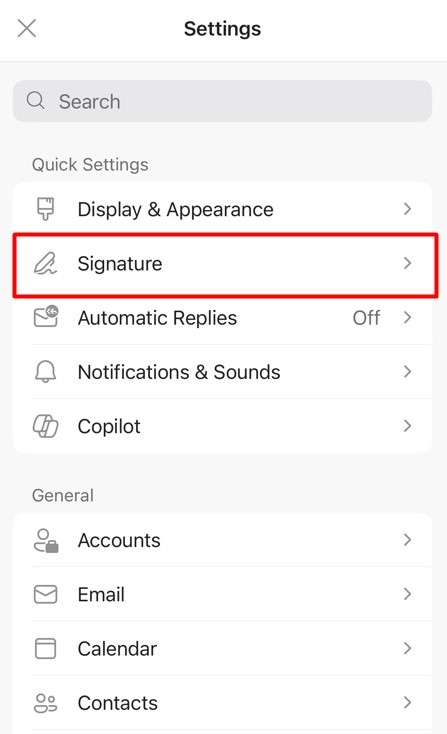
Scroll down and tap Signature under the Mail section.
4. Delete Your Signature
- Remove all text in the signature box
- Leave it completely blank
5. Check Multiple Accounts (Important)
If you have multiple email accounts:
- Look for “Per Account Signature”
- Remove the signature from each account if enabled
6. Save Changes
Exit the screen—your changes are saved automatically.
✅ Test the proper signature removal setup
Send a test email from your phone:
- No signature = ✅ Correct
- Signature still appears = check other devices or accounts
⚠️
Common Issues After You Remove Outlook Mobile Signature (Quick Fixes)
- Duplicate signatures → Local signature still exists
- Signature still showing → Multiple accounts not updated
- Still not fixed → Desktop or Outlook Web signature still active
💼 Implement Automated Email Signatures for Your Business
If you’re looking to deploy automated email signatures using Exclaimer, we can help you:
- Design professional, branded signatures
- Deploy across Microsoft 365 or Google Workspace
- Ensure a smooth rollout with minimal disruption
- Provide ongoing support