

Technology should help your business operate more efficiently, stay secure, and grow with confidence. It should not become a constant source of downtime, frustration, unexpected costs, or security concerns.
For many small and midsize businesses, managing technology internally becomes more difficult as the organization grows. Employees rely on Microsoft 365, cloud applications, laptops, mobile devices, business internet, cybersecurity tools, backups, file sharing, and remote access every day. When any one of those systems fails, productivity can quickly come to a stop.
Managed IT services provide businesses with ongoing technology support, monitoring, cybersecurity, strategic guidance, and system management without requiring the cost and complexity of building a full internal IT department.
At Orinoco 360, we help businesses throughout South Florida manage their technology with a proactive, business-focused approach. Our goal is not simply to fix computers when something breaks. We help organizations reduce technology problems, strengthen cybersecurity, improve productivity, and make better long-term IT decisions.
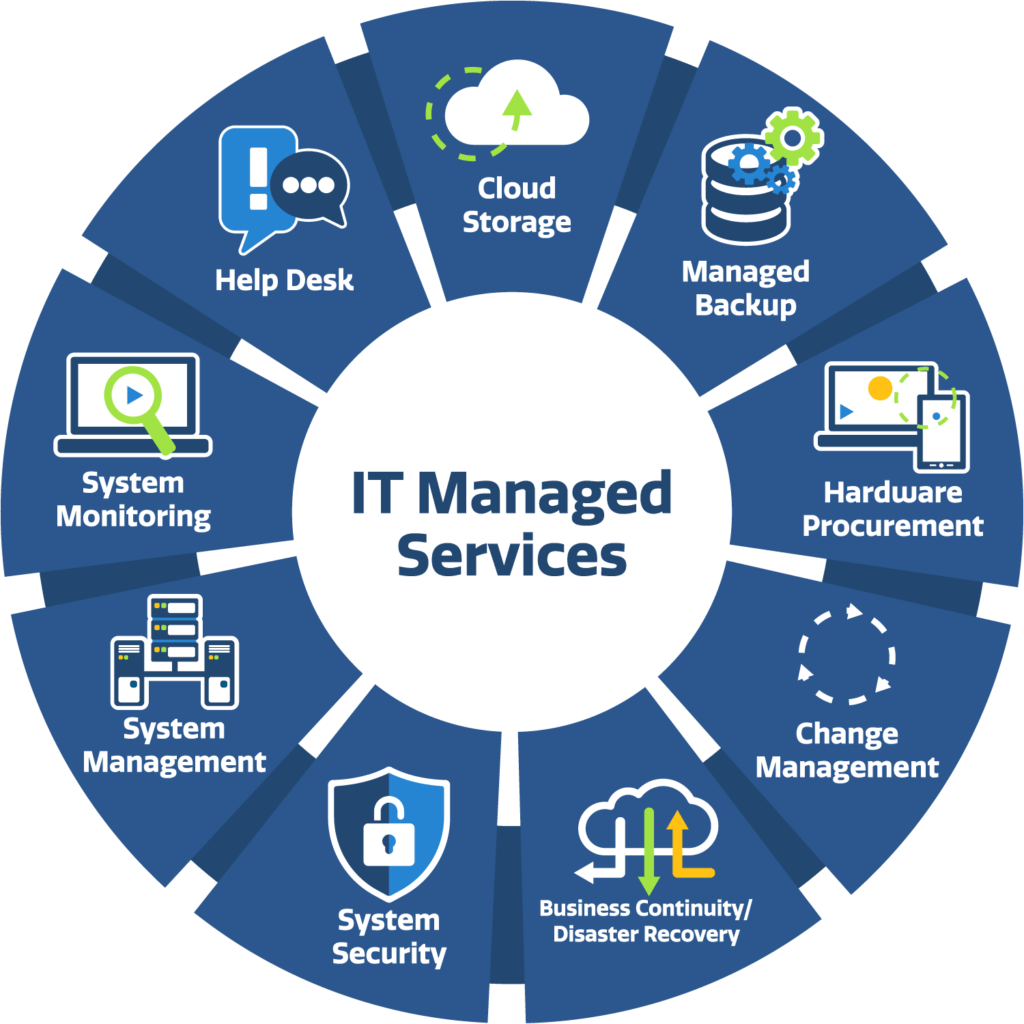
What Are Managed IT Services?
Managed IT services are ongoing technology services provided by an external IT company or Managed Service Provider, often called an MSP.
Instead of calling an IT technician only when something breaks, businesses work with a managed IT provider to continuously monitor, maintain, secure, and improve their technology environment.
Managed IT services can include:
- Help desk support
- Computer and device management
- Microsoft 365 administration
- Cybersecurity
- Network monitoring
- Cloud services
- Backup and disaster recovery
- Email security
- User onboarding and offboarding
- Software and patch management
- Vendor coordination
- Technology planning
- IT consulting
- Security awareness training
- Remote and onsite support
The exact services depend on the needs of the organization.
For many businesses, the biggest advantage is having one technology partner responsible for the overall IT environment instead of relying on multiple vendors and reacting to problems individually.
What Does a Managed IT Company Actually Do?
A managed IT company becomes an extension of your business.
The provider helps manage the technology your employees depend on every day and works to identify problems before they interrupt operations.
A typical managed IT relationship may include monitoring computers and networks, managing Microsoft 365, protecting endpoints from cyber threats, maintaining backups, installing updates, supporting users, and helping leadership plan future technology investments.
For example, when a new employee joins your company, your managed IT provider can help:
- Create the employee’s Microsoft 365 account
- Assign the appropriate licenses
- Configure email
- Set up security policies
- Prepare the employee’s computer
- Install required business applications
- Configure access to files and systems
- Enroll the device in security and management platforms
When that employee leaves, the process happens in reverse to ensure company information remains protected.
This type of standardized technology management becomes increasingly important as a company grows.
Managed IT Services vs. Break-Fix IT Support
Traditional IT support often follows a break-fix model.
Something breaks.
The business calls an IT technician.
The technician fixes the problem.
The company receives a bill.
Then everyone waits for the next problem.
Managed IT works differently.
The goal is to prevent as many problems as possible before employees experience them.
Instead of focusing only on repairs, managed IT providers continuously monitor systems, maintain devices, install security updates, review backups, and identify potential risks.
The difference is similar to maintaining a vehicle.
You can wait until the engine fails and call a mechanic, or you can perform regular maintenance that reduces the likelihood of a major failure.
Businesses increasingly choose managed IT because downtime is expensive and cybersecurity threats are too serious to manage reactively.
What Businesses Benefit Most from Managed IT Services?
Managed IT services can benefit organizations of almost any size, but they are particularly valuable for small and midsize businesses that depend heavily on technology without maintaining a large internal IT department.
Common examples include:
- Professional services firms
- Healthcare organizations
- Law firms
- Accounting firms
- Manufacturers
- Distributors
- Logistics companies
- Construction companies
- Property management firms
- Nonprofit organizations
- Financial services companies
- Multi-location businesses
Organizations with approximately 10 to several hundred employees often find managed IT especially valuable because their technology environment has become too complex for informal support but may not justify building a full internal IT team.
What Problems Can Managed IT Services Solve?
Many organizations begin looking for an IT partner because of one specific problem.
But that problem is often a symptom of a larger technology issue.
Common examples include:
“Our computers are always slow.”
Slow computers may result from aging hardware, missing updates, storage issues, malware, poorly configured software, or inadequate network performance.
A managed IT provider can identify the underlying cause rather than repeatedly treating the symptoms.
“Our employees wait too long for IT support.”
Technology problems directly affect productivity.
If an employee cannot access email, open a business application, connect to the network, or retrieve an important file, work may stop completely.
A structured help desk gives employees a reliable way to request assistance and provides the business with visibility into recurring technology issues.
“We don’t know if our backups actually work.”
Many businesses discover backup problems only after they need to restore data.
A managed IT provider can monitor backups, test recovery procedures, and help ensure critical information can be recovered after accidental deletion, equipment failure, ransomware, or another disaster.
“We’re worried about cybersecurity.”
Cybersecurity has become one of the primary reasons businesses seek managed IT services.
A modern managed IT provider can help implement multiple layers of protection, including:
- Endpoint detection and response
- Email security
- Multi-Factor Authentication
- Security awareness training
- Backup protection
- DNS and web filtering
- Device encryption
- Patch management
- Identity protection
- Vulnerability management
No cybersecurity strategy can eliminate every risk, but properly layered protection can significantly reduce exposure.
“Nobody really manages Microsoft 365.”
Cloud productivity platforms such as Microsoft 365 and Google Workspace have become some of the most important systems businesses rely on every day.
Yet many organizations have no one actively managing licensing, security settings, Teams, SharePoint, OneDrive, user accounts, email protection, and identity policies.
A managed IT provider can take ownership of the Microsoft 365 environment and help the organization get more value from its investment.
“We have too many technology vendors.”
A growing business may have separate providers for:
- Internet
- Phones
- Microsoft licensing
- Security
- Printers
- Cloud applications
- Networking
- Backup systems
- Website services
When something goes wrong, each vendor may blame another.
A managed IT provider can act as the primary technology contact and coordinate vendors on behalf of the business.
What Is Included in Managed IT Services?
The exact scope varies between providers, but a comprehensive managed IT service typically includes several core areas.
Help Desk and End-User Support
Employees need a reliable way to get help when technology problems occur.
Managed help desk services can assist with issues such as:
- Outlook problems
- Password resets
- Printer issues
- Microsoft Teams
- Application errors
- Network access
- VPN problems
- Slow computers
- File access
- Microsoft 365 questions
A good help desk does more than close tickets. It identifies recurring problems and helps prevent them from continuing.
Remote Monitoring and Management
Modern MSPs use Remote Monitoring and Management systems to continuously monitor company computers and servers.
These systems can help IT teams:
- Monitor device health
- Install updates
- Track hardware performance
- Detect problems
- Deploy applications
- Remotely assist users
- Maintain standardized configurations
This allows many issues to be identified before employees even notice them.
Microsoft 365 Management
For many organizations, Microsoft 365 is the center of daily business operations.
Managed Microsoft 365 services can include:
- User administration
- License management
- Exchange Online
- Outlook support
- Microsoft Teams
- SharePoint
- OneDrive
- Microsoft Entra ID
- Microsoft Intune
- Microsoft Defender
- Multi-Factor Authentication
- Conditional Access
- Microsoft Copilot readiness
A properly managed Microsoft 365 environment can improve productivity while significantly strengthening security.
Google Workspace Management
Not every business operates on Microsoft 365—and it shouldn’t have to.
Many small and midsize businesses use Google Workspace as the foundation for email, cloud storage, collaboration, video conferencing, and employee productivity.
A managed IT provider should be able to support your business technology regardless of whether your organization primarily uses Microsoft 365, Google Workspace, or a combination of both platforms.
Orinoco 360 can help businesses manage and support Google Workspace environments, including:
- Gmail for business
- Google Drive
- Shared Drives
- Google Docs
- Google Sheets
- Google Slides
- Google Meet
- Google Chat
- Google Calendar
- User and group administration
- Google Admin Console
- User onboarding and offboarding
- Multi-Factor Authentication and account security
- Device and endpoint management
- Data retention and Google Vault
- Google Workspace licensing
- File sharing and permission management
- Security configuration
- Backup strategy
- Gemini and AI readiness
The objective is the same regardless of which productivity platform your business chooses: make sure your employees can work efficiently while keeping company information secure and manageable.
Can an IT Company Manage Google Workspace?
Yes.
A managed IT provider can administer your Google Workspace environment, manage users and licenses, configure security settings, protect accounts, manage devices, support Gmail and Google Drive, troubleshoot employee issues, and help your organization establish appropriate policies for sharing and protecting business information.
Google Workspace also provides centralized administration and security capabilities that allow organizations to manage users, access, devices, authentication, and company information from the Google Admin Console.
However, simply purchasing Google Workspace does not mean those capabilities have been configured correctly.
As with Microsoft 365, the value of the platform depends heavily on how it is configured, secured, managed, and used.
Google Workspace Security
Businesses using Google Workspace should take the same proactive approach to cybersecurity as organizations using Microsoft 365.
That includes reviewing:
- Multi-Factor Authentication
- Administrator privileges
- User account security
- Employee onboarding and offboarding
- External file sharing
- Google Drive permissions
- Endpoint security
- Mobile device access
- Email security
- Data retention
- Backup and recovery
- Third-party application access
These controls become especially important when employees share files externally or access company information from personal or mobile devices.
Google Workspace and Gemini AI
Artificial intelligence is also becoming an important part of the Google Workspace ecosystem.
Gemini capabilities are integrated across Google Workspace applications and can assist employees with activities such as drafting emails, summarizing information, working with documents and spreadsheets, and improving meeting productivity.
As with Microsoft Copilot, businesses should establish appropriate security, permissions, data governance, and AI usage policies before deploying AI broadly across the organization.
AI should make company information more useful—not accidentally make sensitive information easier for the wrong employees to discover.
Microsoft 365 or Google Workspace: Which Is Better?
There is no universal answer.
Microsoft 365 may be a better fit for organizations that rely heavily on Windows, Outlook, Excel, Microsoft Teams, SharePoint, or Microsoft-specific business applications.
Google Workspace may be an excellent fit for organizations that prefer browser-based applications, Gmail, Google Drive, real-time document collaboration, and Google’s cloud-first ecosystem.
Some businesses even operate in mixed environments.
The right decision depends on factors such as:
- Existing business applications
- Employee workflows
- Security requirements
- Compliance requirements
- Device types
- Collaboration needs
- Business size
- Industry requirements
- Licensing costs
- Long-term technology strategy
Our role at Orinoco 360 is not to force every organization onto the same technology platform.
Our role is to understand how your business operates, help you select the technology that makes sense for your organization, and then ensure that environment is properly managed, secured, supported, and optimized.
Whether your business operates on Microsoft 365, Google Workspace, or a combination of cloud platforms, your technology strategy should ultimately serve the same purpose:
Help your employees work productively, protect your company information, reduce unnecessary complexity, and support the future growth of your business.
Cybersecurity
Cybersecurity should be integrated into managed IT rather than treated as a separate project.
A comprehensive security approach may include:
- Endpoint protection
- Managed detection and response
- Email filtering
- Phishing protection
- Security awareness training
- Multi-Factor Authentication
- DNS protection
- Encryption
- Vulnerability management
- Dark web monitoring
- Backup protection
- Security policy development
The objective is to build multiple layers of security so that one failure does not automatically result in a major incident.
Backup and Disaster Recovery
Businesses should assume that eventually something will go wrong.
Data may be accidentally deleted.
A server may fail.
A laptop may be stolen.
A ransomware attack may occur.
A cloud service may experience an outage.
Backup and disaster recovery planning helps ensure the business can recover when those events happen.
Network Management
Your network connects nearly every piece of technology your business uses.
Managed network services can include:
- Firewalls
- Internet connectivity
- Wi-Fi
- Network switches
- VLAN configuration
- VPN access
- Network security
- Performance monitoring
- Multi-location connectivity
Poorly designed networks often create recurring reliability and security problems.
Vendor Management
Technology vendors rarely operate independently. Your internet provider affects your firewall.Your firewall affects remote access. Microsoft 365 affects email. Your phone provider may rely on your internet connection.
A managed IT partner can coordinate these relationships and help prevent your employees from spending hours troubleshooting between multiple providers.
Technology Strategy and Planning
One of the most valuable services an MSP can provide is helping leadership make better technology decisions.
Technology planning can include:
- Hardware replacement schedules
- Microsoft 365 licensing reviews
- Cybersecurity planning
- Cloud migration
- AI adoption
- Budget forecasting
- Compliance planning
- Business continuity
- Technology standardization
Instead of reacting to technology purchases individually, businesses can develop a long-term roadmap.
How Much Do Managed IT Services Cost?
Managed IT pricing varies based on several factors, including:
- Number of employees
- Number of computers
- Number of locations
- Security requirements
- Microsoft 365 needs
- Compliance requirements
- Onsite support requirements
- Complexity of the technology environment
Some providers charge per user.
Others charge per device.
Some offer fixed monthly agreements, while others combine recurring services with project or hourly support.
Businesses should evaluate managed IT based on overall value rather than simply selecting the lowest monthly price.
A less expensive provider that responds slowly, lacks cybersecurity expertise, or fails to proactively manage systems may ultimately cost the business significantly more through downtime and security incidents.
Managed IT Services vs. Hiring an Internal IT Employee
One of the most common questions growing businesses ask is whether they should hire an internal IT employee or outsource IT support.
Both approaches can work.
An internal IT employee provides direct familiarity with the organization and can be valuable for larger businesses.
However, a single employee must understand networking, Microsoft 365, cybersecurity, cloud systems, hardware, backups, applications, compliance, and end-user support.
That is an enormous range of responsibilities for one person.
Managed IT provides access to a broader team with different areas of expertise.
For many small and midsize businesses, the most effective model is either fully outsourced IT or a co-managed model where an MSP works alongside an internal IT employee.
What Should You Look for in a Managed IT Provider?
Choosing an IT provider should involve more than comparing prices.
Ask prospective providers:
- How quickly do you respond to support requests?
- What cybersecurity services are included?
- Do you manage Microsoft 365?
- How do you monitor backups?
- Can you provide onsite support?
- How do you handle employee onboarding and offboarding?
- What happens after hours?
- How do you document our environment?
- Do you help with technology planning?
- Who owns our passwords and documentation?
- How do you protect your own systems?
- Can you support multiple business locations?
- How do you communicate during major incidents?
The best MSP relationship should feel like an extension of your internal team.
Why South Florida Businesses Need a Local Technology Partner
South Florida has a diverse business environment that includes healthcare, logistics, manufacturing, professional services, real estate, construction, hospitality, financial services, and international businesses.
Many organizations also operate across multiple locations or maintain employees who travel frequently throughout the region.
Working with a technology partner familiar with the South Florida market can provide several advantages, including the ability to combine remote support with local onsite assistance when necessary.
Orinoco 360 works with businesses throughout Broward, Palm Beach, and Miami-Dade counties, including communities such as Coral Springs, Parkland, Coconut Creek, Boca Raton, Deerfield Beach, Pompano Beach, Fort Lauderdale, Plantation, Sunrise, Weston, Davie, Hollywood, Pembroke Pines, Aventura, Doral, and Miami.
Why Businesses Choose Orinoco 360 for Managed IT Services
At Orinoco 360, we believe businesses should understand their technology rather than feel controlled by it.
Our approach focuses on three principles:
Keep technology reliable.
Employees should be able to work without constantly dealing with IT problems.
Keep the business secure.
Cybersecurity must be integrated into everyday technology management.
Make technology support the business.
IT decisions should align with operational goals, growth plans, security requirements, and budget realities.
We work closely with business owners and leadership teams to provide ongoing support while also helping organizations plan for what comes next.
That may include improving Microsoft 365, strengthening cybersecurity, replacing aging infrastructure, moving systems to the cloud, supporting new locations, or preparing the organization for artificial intelligence.
Frequently Asked Questions About Managed IT Services
What is a Managed Service Provider?
A Managed Service Provider, or MSP, is an external technology company that manages and supports an organization’s IT systems on an ongoing basis.
Can an MSP manage Microsoft 365?
Yes. A qualified MSP can manage Microsoft 365 licensing, users, Outlook, Exchange Online, Teams, SharePoint, OneDrive, security, Intune, Defender, Entra ID, and related services.
Can an MSP manage Google Workspace?
Yes. A managed IT provider can manage Google Workspace users, Gmail, Drive, Shared Drives, Meet, security settings, devices, licensing, onboarding, offboarding, backups, and ongoing administration.
Do managed IT services include cybersecurity?
They should. Modern managed IT agreements typically include cybersecurity protections or provide them as part of an enhanced security package.
Can an MSP support remote employees?
Yes. Most modern MSPs can securely support employees regardless of whether they work from the office, home, or another location.
Can a managed IT provider support multiple offices?
Yes.
MSPs commonly manage organizations with multiple locations, including networks, internet connections, Microsoft 365 environments, security, and remote users.
Do small businesses need managed IT services?
Not every small business needs a full managed services agreement.
However, once a business depends heavily on technology, handles sensitive information, or has multiple employees relying on shared systems, professional IT management can significantly reduce operational and cybersecurity risk.
Can an MSP replace an internal IT department?
For many small and midsize organizations, yes.
Larger businesses may instead use a co-managed model where the MSP supports an internal technology team.
How do I know if my current IT provider is doing a good job?
Your IT provider should be able to clearly explain:
- What systems they manage
- How your business is protected
- Whether backups are working
- What technology risks exist
- What improvements they recommend
- How quickly support requests are handled
If those answers are unclear, it may be time for an independent technology review.
Does Orinoco 360 support both Microsoft 365 and Google Workspace?
Yes. Orinoco 360 supports businesses using Microsoft 365, Google Workspace, and mixed technology environments. The appropriate platform depends on the organization’s applications, workflows, security requirements, and business objectives.
Can you migrate Google Workspace to Microsoft 365?
Yes. Businesses can migrate email, files, calendars, and other information from Google Workspace to Microsoft 365 when changing platforms makes business sense. A migration should be carefully planned to minimize downtime and preserve business data.
Can you migrate Microsoft 365 to Google Workspace?
Yes. Organizations moving in the opposite direction can also migrate from Microsoft 365 to Google Workspace. The decision should be based on business requirements rather than assuming one platform is automatically superior.
Ready to Take a More Strategic Approach to IT?
If your business is dealing with recurring technology problems, cybersecurity concerns, unreliable support, or simply wants a clearer technology strategy, Orinoco 360 can help.
We work with small and midsize businesses throughout South Florida to provide managed IT services, Microsoft 365 management, cybersecurity, cloud solutions, backup, and strategic technology consulting.
Schedule a consultation with Orinoco 360 to discuss your current technology environment and identify opportunities to improve reliability, security, and productivity.